
HackSearch is a specialized browser extension designed for security researchers and penetration testers. It streamlines the initial phase of security testing—Passive Reconnaissance—by providing quick access to multiple search engines and specialized databases directly from your browser’s context menu.
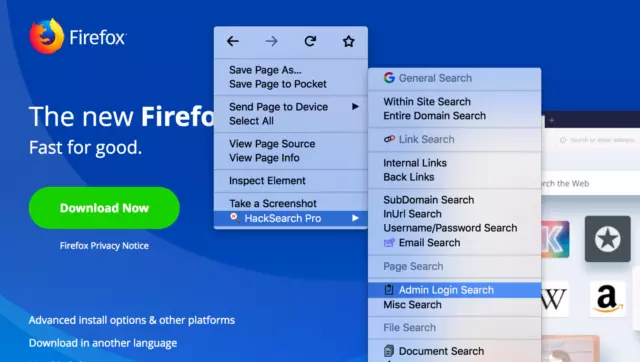
What is Passive Reconnaissance?
At the beginning of any security assessment, gathering information about the target is crucial. We categorize this reconnaissance into two types:
- Active Reconnaissance: Interacting directly with the target system (e.g., port scanning). This is often noisy and can be detected.
- Passive Reconnaissance: Gathering information from public records, search engines, and third-party databases without ever touching the target’s servers. This is stealthy and provides a wealth of metadata.
How to use HackSearch
- Install the extension (links below).
- Navigate to the website you want to research.
- Right-click anywhere on the page to open the context menu.
- Select HackSearch and choose from various research options (e.g., DNS history, subdomains, cached pages).
- Analyze the results to find sensitive data that should not be public (e.g., leaked credentials, dev subdomains).
Key Research Tools Integrated
- Search Dorks: One-click Google hacking queries.
- Whois & DNS: Quick lookup of registrar and record details.
- Social Media Presence: Finding associated profiles for OSINT.
- Wayback Machine: Accessing historical snapshots of the target.
Install
HackSearch is available for both Firefox and Chrome users:
For Firefox Users:
For Chrome Users:
You can manually install the extension by following these steps:
- Download the Chrome package (.crx) from here.
- Open Chrome and navigate to
chrome://extensions. - Enable Developer Mode in the top right.
- Drag and Drop the downloaded file onto the page to install.